 42b28993b2
Updated by "Cleanup translation files" add-on in Weblate.

Translation: Trilium Notes/README
Translate-URL: https://hosted.weblate.org/projects/trilium/readme/
15 KiB
Vendored

Warp, built for coding with multiple AI agents
Available for macOS, Linux and Windows
트릴리움 노트





Chinese (Simplified Han script) | Chinese (Traditional Han script) | English | French | German | Greek | Italian | Japanese | Romanian | Spanish
Trilium Notes는 대규모 개인 지식 기반 구축에 중점을 둔 무료 오픈 소스 크로스 플랫폼 계층적 메모 작성 애플리케이션입니다.
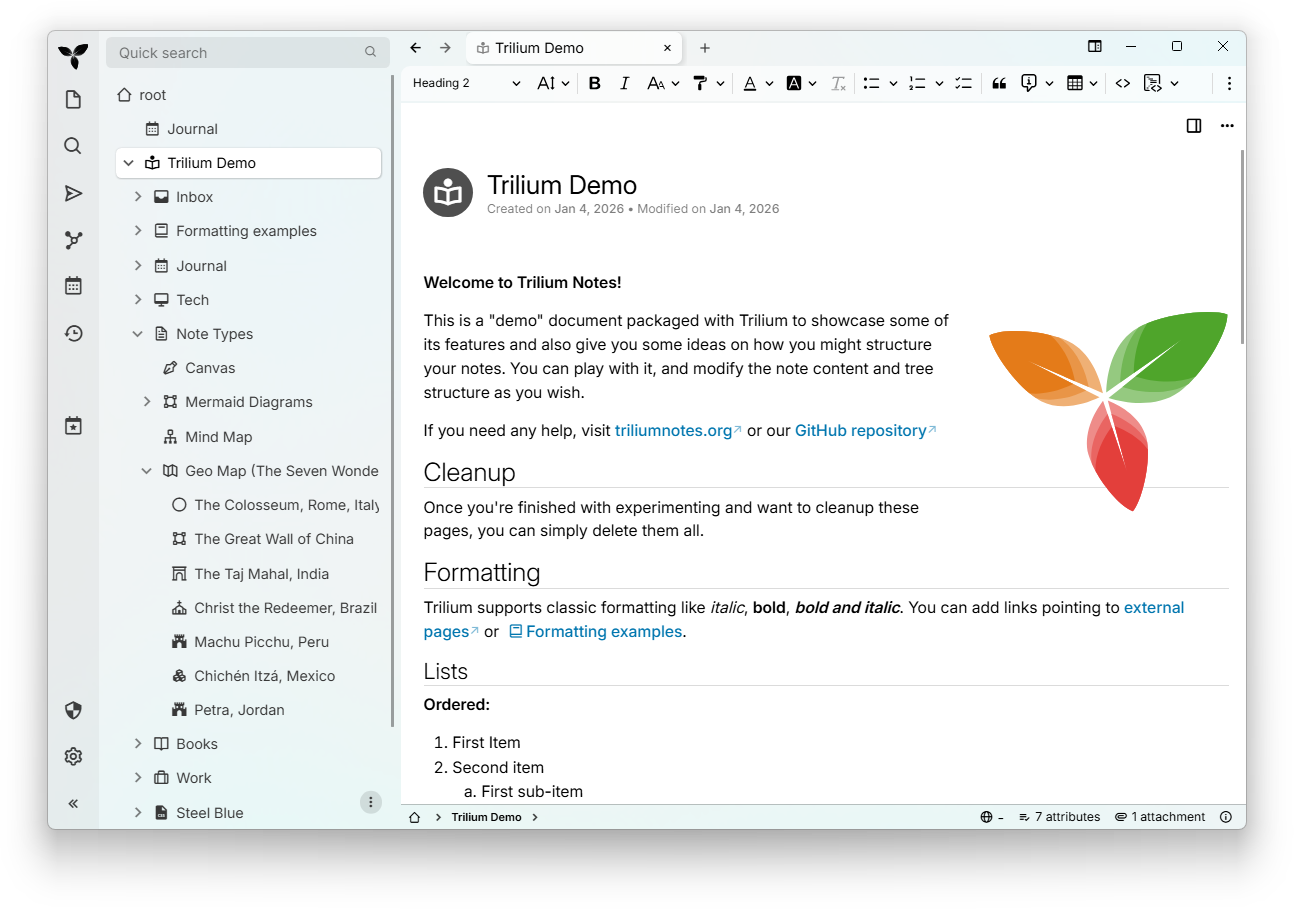
⏬ 다운로드
📚 문서
docs.triliumnotes.org에서 전체 문서를 확인하세요
문서는 다양한 형식으로 제공됩니다:
- 온라인 문서: docs.triliumnotes.org에서 모든 문서를 보여줍니다
- 도움말: 트릴리움 어플리케이션에서
F1버튼을 눌러 같은 문서를 직접 볼 수 있습니다 - GitHub: 이 레포지토리의 사용자 가이드에서 확인할 수 있습니다
바로가기
🎁 주요 기능
- 노트는 다양한 깊이의 트리로 배열될 수 있으며, 하나의 노트는 트리의 여러 위치에 둘 수 있음 (cloning 참고)
- 마크다운 자동서식과 함께 테이블, 이미지, 그리고 수학 등의 기능을 포함한 다양한 기능의 WYSIWYG 노트 편집기 제공
- 구문 강조를 포함한 소스코드 편집 기능
- 쉽고 빠르게 노트를 찾을 수 있는 내비게이션, 전체 텍스트 검색 및 노트 호이스팅
- 원활한 노트 버전 관리
- 노트의 속성은 노트 조직화, 쿼리, 그리고 고급 기능인 스크립팅에 사용
- 영어, 독일어, 스페인어, 프랑스어, 루마니아어, 중국어 (간체, 번체) UI 제공
- 더욱 안전한 로그인을 위해 직접 OpenID 및 TOTP 통합
- self-hosted 동기화 서버를 통한
동기화
- 동기화 서버를 호스팅하는 타사 서비스가 있습니다
- 노트의 인터넷 공유 (퍼블리싱) 기능
- 노트마다 세분화된 강력한 노트 암호화
- Excalidraw 기반 스케치 다이어그램 (노트 타입 "캔버스")
- 노트와 그 관계를 시각화하기 위한 관계 맵 및 노트/링크 맵
- Mind Elixir 기반 마인드맵
- 위치 핀과 GPX 트랙이 있는 지오맵
- 스크립트 - 고급 쇼케이스
- 자동화를 위한 REST API
- 10만 개 이상의 노트를 처리해도 사용성과 성능 면에서 뛰어난 확장성을 실현
- 스마트폰 및 태블릿용 터치 조작에 최적화된 모바일 프런트엔드
- 기본 제공 다크 테마, 사용자 테마 지원
- [Evernote] (https://docs.triliumnotes.org/user-guide/concepts/import-export/evernote) 및 [Markdown 가져오기 및 내보내기] (https://docs.triliumnotes.org/user-guide/concepts/import-export/markdown)
- Web Clipper 웹 콘텐츠의 쉬운 저장
- 사용자 정의 가능한 UI(사이드바 버튼, 사용자 정의 위젯 등)
- 메트릭과 Grafana 대시보드가 함께 제공됩니다.
✨ TriliumNext 관련 유용한 정보를 더 보시려면 아래의 서드파티 리소스/커뮤니티를 확인해 보세요:
- awesome-trilium은 서드파티 테마, 스크립트, 플러그인 등을 위한 것입니다.
- TriliumRocks! 튜토리얼, 가이드 및 기타 여러 가지를 확인하세요.
❓왜 TriliumNext일까?
Trilium의 최초 개발자(Zadam)는 Trilium 저장소를 커뮤니티 프로젝트에 흔쾌히 제공했으며, 해당 저장소는 https://github.com/TriliumNext에 있습니다.
⬆️Zadam/Trilium에서 마이그레이션하시나요?
zadam/Trilium 인스턴스에서 TriliumNext/Trilium 인스턴스로 마이그레이션하는 데 특별한 절차는 없습니다. 평소처럼 TriliumNext/Trilium을 설치하면 기존 데이터베이스를 사용하게 됩니다.
v0.90.4까지의 버전은 v0.63.7의 최신 zadam/trilium 버전과 호환됩니다. 이후 버전의 TriliumNext/Trilium은 동기화 버전이 증가되어 직접 마이그레이션이 불가능합니다.
💬 Discuss with us
Feel free to join our official conversations. We would love to hear what features, suggestions, or issues you may have!
- Matrix (For synchronous
discussions.)
General매트릭스 룸은 XMPP에도 브리지되어 있습니다
- Github Discussions (비동기 토론용)
- Github Issues (버그 보고 및 기능 요청용)
🏗 설치
윈도우 / 맥OS
최신 릴리스 페이지에서 플랫폼에 해당하는
바이너리 릴리스를 다운로드한 뒤, 패키지의 압축을 풀고 trilium 실행 파일을 실행하세요.
Linux
If your distribution is listed in the table below, use your distribution's package.

You may also download the binary release for your platform from the latest
release page, unzip the
package and run the trilium executable.
TriliumNext is also provided as a Flatpak, but not yet published on FlatHub.
브라우저 (모든 운영체제)
서버 설치(아래 참조)를 사용하는 경우 데스크톱 앱과 거의 동일한 웹 인터페이스에 직접 액세스할 수 있습니다.
현재는 크롬과 파이어폭스의 최신 버전만 지원(및 테스트)됩니다.
모바일
모바일 기기에서 TriliumNext를 사용하려면, 모바일 웹 브라우저를 사용하여 서버 설치의 모바일 인터페이스에 접속하면 됩니다(아래 참조).
모바일 앱 지원에 대한 자세한 내용은 https://github.com/TriliumNext/Trilium/issues/4962 이슈를 참조하세요.
네이티브 Android 앱을 선호하는 경우 TriliumDroid를 사용할 수 있습니다. 버그 및 누락된 기능은 해당 저장소에 보고하십시오. 참고: Trilium과 TriliumDroid의 동기화 버전이 일치해야 하므로 TriliumDroid를 사용할 때는 서버 설치에서 자동 업데이트를 비활성화하는 것이 좋습니다(아래 참조).
서버
Dockerhub의 Docker를 통해 TriliumNext를 자체 서버에 설치하려면 서버 설치 문서를 따르세요.
💻 Contribute
Translations
If you are a native speaker, help us translate Trilium by heading over to our Weblate page.
Here's the language coverage we have so far:

Code
Download the repository, install dependencies using pnpm and then run the
server (available at http://localhost:8080):
git clone https://github.com/TriliumNext/Trilium.git
cd Trilium
pnpm install
pnpm run server:start
Documentation
저장소를 다운로드하고 pnpm을 사용하여 종속성을 설치한 다음 문서 편집에 필요한 환경을 실행하세요.
git clone https://github.com/TriliumNext/Trilium.git
cd Trilium
pnpm install
pnpm edit-docs:edit-docs
실행 파일 빌드
저장소를 다운로드하고 pnpm을 사용하여 종속성을 설치한 다음 Windows용 데스크톱 앱을 빌드하세요.
git clone https://github.com/TriliumNext/Trilium.git
cd Trilium
pnpm install
pnpm run --filter desktop electron-forge:make --arch=x64 --platform=win32
자세한 내용은 development docs를 참고하세요.
개발자 문서
자세한 내용은 문서 가이드를 참조하십시오. 추가 질문이 있으시면 위의 "문의하기" 섹션에 설명된 링크를 통해 언제든지 문의해 주십시오.
👏 Shoutouts
- zadam은 애플리케이션의 원래 개념과 구현에 대한 공로를 인정받았습니다.
- Sarah Hussein은 애플리케이션 아이콘을 디자인했습니다.
- nriver 국제화에 공헌.
- Thomas Frei for his original work on the Canvas.
- antoniotejada for the original syntax highlight widget.
- Dosu for providing us with the automated responses to GitHub issues and discussions.
- Tabler Icons for the system tray icons.
Trilium would not be possible without the technologies behind it:
- CKEditor 5 - the visual editor behind text notes. We are grateful for being offered a set of the premium features.
- CodeMirror - code editor with support for huge amount of languages.
- Excalidraw - the infinite whiteboard used in Canvas notes.
- Mind Elixir - providing the mind map functionality.
- Leaflet - for rendering geographical maps.
- Tabulator - for the interactive table used in collections.
- FancyTree - feature-rich tree library without real competition.
- jsPlumb - visual connectivity library. Used in relation maps and link maps
🤝 Support
Trilium is built and maintained with hundreds of hours of work. Your support keeps it open-source, improves features, and covers costs such as hosting.
Consider supporting the main developer (eliandoran) of the application via:
🔑 License
Copyright 2017-2025 zadam, Elian Doran, and other contributors
This program is free software: you can redistribute it and/or modify it under the terms of the GNU Affero General Public License as published by the Free Software Foundation, either version 3 of the License, or (at your option) any later version.