
Warp, built for coding with multiple AI agents
Available for macOS, Linux and Windows
 ## ⏬ 다운로드
- [최신 릴리스](https://github.com/TriliumNext/Trilium/releases/latest) – 안정된 버전으로
대부분의 사용자에게 권장됩니다.
- [야간 빌드](https://github.com/TriliumNext/Trilium/releases/tag/nightly) – 불안정한 개발
버전으로, 최신 기능과 수정 사항이 매일 업데이트됩니다.
## 📚 문서
**[docs.triliumnotes.org](https://docs.triliumnotes.org/)에서 전체 문서를 확인하세요**
문서는 다양한 형식으로 제공됩니다:
- **온라인 문서**: [docs.triliumnotes.org](https://docs.triliumnotes.org/)에서 모든 문서를
보여줍니다
- **도움말**: 트릴리움 어플리케이션에서 `F1` 버튼을 눌러 같은 문서를 직접 볼 수 있습니다
- **GitHub**: 이 레포지토리의 [사용자 가이드](./User%20Guide/User%20Guide/)에서 확인할 수 있습니다
### 바로가기
- [시작하기 가이드](https://docs.triliumnotes.org/)
- [설치 방법](https://docs.triliumnotes.org/user-guide/setup)
- [도커
설치](https://docs.triliumnotes.org/user-guide/setup/server/installation/docker)
- [TriliumNext로 업그레이드](https://docs.triliumnotes.org/user-guide/setup/upgrading)
- [기본 개념 및 기능](https://docs.triliumnotes.org/user-guide/concepts/notes)
- [개인 지식 베이스의
패턴들](https://docs.triliumnotes.org/user-guide/misc/patterns-of-personal-knowledge)
## 🎁 주요 기능
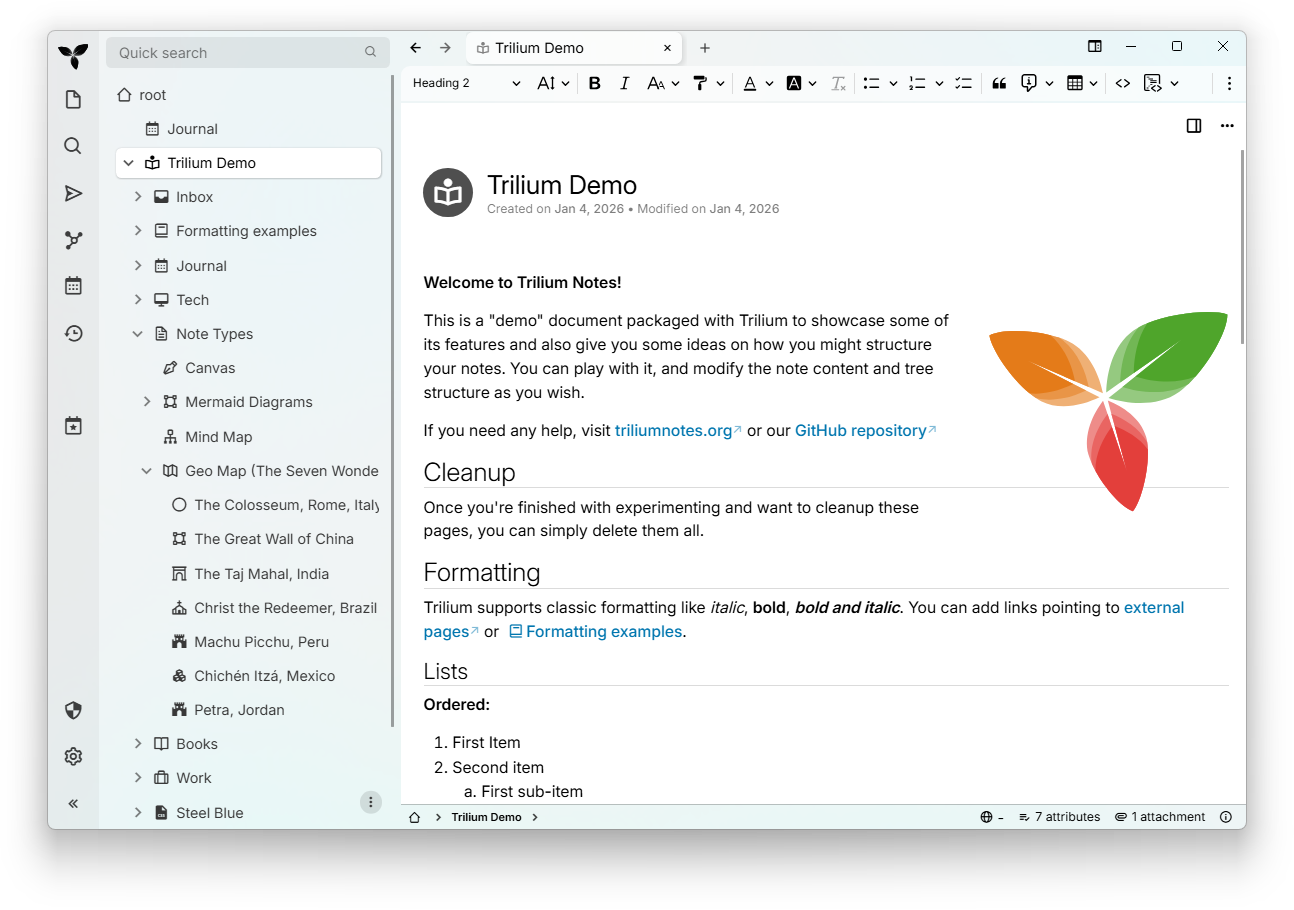
* 노트는 다양한 깊이의 트리로 배열될 수 있으며, 하나의 노트는 트리의 여러 위치에 둘 수 있음
([cloning](https://docs.triliumnotes.org/user-guide/concepts/notes/cloning)
참고)
* 마크다운
[자동서식](https://docs.triliumnotes.org/user-guide/note-types/text/markdown-formatting)과
함께 테이블, 이미지, 그리고
[수학](https://docs.triliumnotes.org/user-guide/note-types/text) 등의 기능을 포함한 다양한
기능의 WYSIWYG 노트 편집기 제공
* 구문 강조를 포함한 [소스코드](https://docs.triliumnotes.org/user-guide/note-types/code) 편집
기능
* 쉽고 빠르게 노트를 찾을 수 있는
[내비게이션](https://docs.triliumnotes.org/user-guide/concepts/navigation/note-navigation),
전체 텍스트 검색 및 [노트
호이스팅](https://docs.triliumnotes.org/user-guide/concepts/navigation/note-hoisting)
* 원활한 [노트 버전
관리](https://docs.triliumnotes.org/user-guide/concepts/notes/note-revisions)
* 노트의 [속성](https://docs.triliumnotes.org/user-guide/advanced-usage/attributes)은
노트 조직화, 쿼리, 그리고 고급 기능인
[스크립팅](https://docs.triliumnotes.org/user-guide/scripts)에 사용
* 영어, 독일어, 스페인어, 프랑스어, 루마니아어, 중국어 (간체, 번체) UI 제공
* 더욱 안전한 로그인을 위해 직접 [OpenID 및 TOTP
통합](https://docs.triliumnotes.org/user-guide/setup/server/mfa)
* self-hosted 동기화 서버를 통한
[동기화](https://docs.triliumnotes.org/user-guide/setup/synchronization)
* 동기화 서버를 호스팅하는 [타사
서비스](https://docs.triliumnotes.org/user-guide/setup/server/cloud-hosting)가
있습니다
* 노트의 인터넷 [공유](https://docs.triliumnotes.org/user-guide/advanced-usage/sharing)
(퍼블리싱) 기능
* 노트마다 세분화된 강력한 [노트
암호화](https://docs.triliumnotes.org/user-guide/concepts/notes/protected-notes)
* [Excalidraw](https://excalidraw.com/) 기반 스케치 다이어그램 (노트 타입 "캔버스")
* 노트와 그 관계를 시각화하기 위한 [관계
맵](https://docs.triliumnotes.org/user-guide/note-types/relation-map) 및 [노트/링크
맵](https://docs.triliumnotes.org/user-guide/note-types/note-map)
* [Mind Elixir](https://docs.mind-elixir.com/) 기반 마인드맵
* 위치 핀과 GPX 트랙이 있는
[지오맵](https://docs.triliumnotes.org/user-guide/collections/geomap)
* [스크립트](https://docs.triliumnotes.org/user-guide/scripts) - [고급
쇼케이스](https://docs.triliumnotes.org/user-guide/advanced-usage/advanced-showcases)
* 자동화를 위한 [REST
API](https://docs.triliumnotes.org/user-guide/advanced-usage/etapi)
* 10만 개 이상의 노트를 처리해도 사용성과 성능 면에서 뛰어난 확장성을 실현
* 스마트폰 및 태블릿용 터치 조작에 최적화된 [모바일
프런트엔드](https://docs.triliumnotes.org/user-guide/setup/mobile-frontend)
* 기본 제공 [다크 테마](https://docs.triliumnotes.org/user-guide/concepts/themes), 사용자
테마 지원
* [Evernote]
(https://docs.triliumnotes.org/user-guide/concepts/import-export/evernote) 및
[Markdown 가져오기 및 내보내기]
(https://docs.triliumnotes.org/user-guide/concepts/import-export/markdown)
* [Web Clipper](https://docs.triliumnotes.org/user-guide/setup/web-clipper) 웹
콘텐츠의 쉬운 저장
* 사용자 정의 가능한 UI(사이드바 버튼, 사용자 정의 위젯 등)
* [메트릭](https://docs.triliumnotes.org/user-guide/advanced-usage/metrics)과
Grafana 대시보드가 함께 제공됩니다.
✨ TriliumNext 관련 유용한 정보를 더 보시려면 아래의 서드파티 리소스/커뮤니티를 확인해 보세요:
- [awesome-trilium](https://github.com/Nriver/awesome-trilium)은 서드파티 테마, 스크립트,
플러그인 등을 위한 것입니다.
- [TriliumRocks!](https://trilium.rocks/) 튜토리얼, 가이드 및 기타 여러 가지를 확인하세요.
## ❓왜 TriliumNext일까?
Trilium의 최초 개발자([Zadam](https://github.com/zadam))는 Trilium 저장소를 커뮤니티 프로젝트에 흔쾌히
제공했으며, 해당 저장소는 https://github.com/TriliumNext에 있습니다.
### ⬆️Zadam/Trilium에서 마이그레이션하시나요?
zadam/Trilium 인스턴스에서 TriliumNext/Trilium 인스턴스로 마이그레이션하는 데 특별한 절차는 없습니다. 평소처럼
[TriliumNext/Trilium](#-installation)을 설치하면 기존 데이터베이스를 사용하게 됩니다.
[v0.90.4](https://github.com/TriliumNext/Trilium/releases/tag/v0.90.4)까지의 버전은
[v0.63.7](https://github.com/zadam/trilium/releases/tag/v0.63.7)의 최신
zadam/trilium 버전과 호환됩니다. 이후 버전의 TriliumNext/Trilium은 동기화 버전이 증가되어 직접 마이그레이션이
불가능합니다.
## 💬 함께 토론해 보세요
저희 공식 대화에 자유롭게 참여해 주세요. 어떤 기능, 제안 또는 문제점이 있으시면 언제든지 알려주세요!
- [Matrix](https://matrix.to/#/#triliumnext:matrix.org) (동기식 토론용)
- `General` 매트릭스 룸은 [XMPP](xmpp:discuss@trilium.thisgreat.party?join)에도 브리지되어
있습니다
- [Github Discussions](https://github.com/TriliumNext/Trilium/discussions) (비동기
토론용)
- [Github Issues](https://github.com/TriliumNext/Trilium/issues) (버그 보고 및 기능
요청용)
## 🏗 설치
### 윈도우 / 맥OS
[최신 릴리스 페이지](https://github.com/TriliumNext/Trilium/releases/latest)에서 플랫폼에 해당하는
바이너리 릴리스를 다운로드한 뒤, 패키지의 압축을 풀고 `trilium` 실행 파일을 실행하세요.
### Linux
사용하시는 배포판이 아래 표에 나와 있다면 해당 배포판의 패키지를 사용하십시오.
[](https://repology.org/project/triliumnext/versions)
또한 [최신 릴리스 페이지](https://github.com/TriliumNext/Trilium/releases/latest)에서 해당
플랫폼용 바이너리 릴리스를 다운로드하고 패키지의 압축을 풀고 `trilium` 실행 파일을 실행할 수도 있습니다.
TriliumNext는 Flatpak으로도 제공되지만, 아직 FlatHub에는 게시되지 않았습니다.
### 브라우저 (모든 운영체제)
서버 설치(아래 참조)를 사용하는 경우 데스크톱 앱과 거의 동일한 웹 인터페이스에 직접 액세스할 수 있습니다.
현재는 크롬과 파이어폭스의 최신 버전만 지원(및 테스트)됩니다.
### 모바일
모바일 기기에서 TriliumNext를 사용하려면, 모바일 웹 브라우저를 사용하여 서버 설치의 모바일 인터페이스에 접속하면 됩니다(아래 참조).
모바일 앱 지원에 대한 자세한 내용은 https://github.com/TriliumNext/Trilium/issues/4962 이슈를
참조하세요.
네이티브 Android 앱을 선호하는 경우
[TriliumDroid](https://apt.izzysoft.de/fdroid/index/apk/eu.fliegendewurst.triliumdroid)를
사용할 수 있습니다. 버그 및 누락된 기능은 [해당
저장소](https://github.com/FliegendeWurst/TriliumDroid)에 보고하십시오. 참고: Trilium과
TriliumDroid의 동기화 버전이 일치해야 하므로 TriliumDroid를 사용할 때는 서버 설치에서 자동 업데이트를 비활성화하는 것이
좋습니다(아래 참조).
### 서버
[Dockerhub](https://hub.docker.com/r/triliumnext/trilium)의 Docker를 통해
TriliumNext를 자체 서버에 설치하려면 [서버 설치
문서](https://docs.triliumnotes.org/user-guide/setup/server)를 따르세요.
## 💻 참여하기
### 번역
원어민이시라면 [Weblate 페이지](https://hosted.weblate.org/engage/trilium/)로 이동하여 Trilium
번역을 도와주세요.
현재까지 지원되는 언어는 다음과 같습니다:
[](https://hosted.weblate.org/engage/trilium/)
### 코드
저장소를 다운로드하고 `pnpm`을 사용하여 종속성을 설치한 다음 서버를 실행하세요(http://localhost:8080에서 접속 가능):
```shell
git clone https://github.com/TriliumNext/Trilium.git
cd Trilium
pnpm install
pnpm run server:start
```
### 문서
저장소를 다운로드하고 `pnpm`을 사용하여 종속성을 설치한 다음 문서 편집에 필요한 환경을 실행하세요.
```shell
git clone https://github.com/TriliumNext/Trilium.git
cd Trilium
pnpm install
pnpm edit-docs:edit-docs
```
### 실행 파일 빌드
저장소를 다운로드하고 `pnpm`을 사용하여 종속성을 설치한 다음 Windows용 데스크톱 앱을 빌드하세요.
```shell
git clone https://github.com/TriliumNext/Trilium.git
cd Trilium
pnpm install
pnpm run --filter desktop electron-forge:make --arch=x64 --platform=win32
```
자세한 내용은 [development
docs](https://github.com/TriliumNext/Trilium/tree/main/docs/Developer%20Guide/Developer%20Guide)를
참고하세요.
### 개발자 문서
자세한 내용은 [문서
가이드](https://github.com/TriliumNext/Trilium/blob/main/docs/Developer%20Guide/Developer%20Guide/Environment%20Setup.md)를
참조하십시오. 추가 질문이 있으시면 위의 "문의하기" 섹션에 설명된 링크를 통해 언제든지 문의해 주십시오.
## 👏 Shoutouts
* [zadam](https://github.com/zadam)은 애플리케이션의 원래 개념과 구현에 대한 공로를 인정받았습니다.
* [Sarah Hussein](https://github.com/Sarah-Hussein)은 애플리케이션 아이콘을 디자인했습니다.
* [nriver](https://github.com/nriver) 국제화에 공헌.
* [Thomas Frei](https://github.com/thfrei) 캔버스에 대한 독창적인 작업.
* [antoniotejada](https://github.com/nriver) 구문 강조 위젯의 원본.
* [Dosu](https://dosu.dev/) GitHub 이슈 및 토론에 대한 자동 응답을 제공.
* [Tabler Icons](https://tabler.io/icons) 시스템 트레이 아이콘.
트릴리움은 다음의 기반 기술들이 없었다면 불가능했을 것입니다:
* [CKEditor 5](https://github.com/ckeditor/ckeditor5) - 텍스트 노트의 시각적 편집기입니다. 프리미엄
기능을 제공해주셔서 감사합니다.
* [CodeMirror](https://github.com/codemirror/CodeMirror) - 수많은 언어를 지원하는 코드 편집기.
* [Excalidraw](https://github.com/excalidraw/excalidraw) - the infinite
whiteboard used in Canvas notes.
* [Mind Elixir](https://github.com/SSShooter/mind-elixir-core) - providing the
mind map functionality.
* [Leaflet](https://github.com/Leaflet/Leaflet) - for rendering geographical
maps.
* [Tabulator](https://github.com/olifolkerd/tabulator) - for the interactive
table used in collections.
* [FancyTree](https://github.com/mar10/fancytree) - feature-rich tree library
without real competition.
* [jsPlumb](https://github.com/jsplumb/jsplumb) - visual connectivity library.
Used in [relation
maps](https://docs.triliumnotes.org/user-guide/note-types/relation-map) and
[link
maps](https://docs.triliumnotes.org/user-guide/advanced-usage/note-map#link-map)
## 🤝 Support
Trilium is built and maintained with [hundreds of hours of
work](https://github.com/TriliumNext/Trilium/graphs/commit-activity). Your
support keeps it open-source, improves features, and covers costs such as
hosting.
Consider supporting the main developer
([eliandoran](https://github.com/eliandoran)) of the application via:
- [GitHub Sponsors](https://github.com/sponsors/eliandoran)
- [PayPal](https://paypal.me/eliandoran)
- [Buy Me a Coffee](https://buymeacoffee.com/eliandoran)
## 🔑 License
Copyright 2017-2025 zadam, Elian Doran, and other contributors
This program is free software: you can redistribute it and/or modify it under
the terms of the GNU Affero General Public License as published by the Free
Software Foundation, either version 3 of the License, or (at your option) any
later version.
## ⏬ 다운로드
- [최신 릴리스](https://github.com/TriliumNext/Trilium/releases/latest) – 안정된 버전으로
대부분의 사용자에게 권장됩니다.
- [야간 빌드](https://github.com/TriliumNext/Trilium/releases/tag/nightly) – 불안정한 개발
버전으로, 최신 기능과 수정 사항이 매일 업데이트됩니다.
## 📚 문서
**[docs.triliumnotes.org](https://docs.triliumnotes.org/)에서 전체 문서를 확인하세요**
문서는 다양한 형식으로 제공됩니다:
- **온라인 문서**: [docs.triliumnotes.org](https://docs.triliumnotes.org/)에서 모든 문서를
보여줍니다
- **도움말**: 트릴리움 어플리케이션에서 `F1` 버튼을 눌러 같은 문서를 직접 볼 수 있습니다
- **GitHub**: 이 레포지토리의 [사용자 가이드](./User%20Guide/User%20Guide/)에서 확인할 수 있습니다
### 바로가기
- [시작하기 가이드](https://docs.triliumnotes.org/)
- [설치 방법](https://docs.triliumnotes.org/user-guide/setup)
- [도커
설치](https://docs.triliumnotes.org/user-guide/setup/server/installation/docker)
- [TriliumNext로 업그레이드](https://docs.triliumnotes.org/user-guide/setup/upgrading)
- [기본 개념 및 기능](https://docs.triliumnotes.org/user-guide/concepts/notes)
- [개인 지식 베이스의
패턴들](https://docs.triliumnotes.org/user-guide/misc/patterns-of-personal-knowledge)
## 🎁 주요 기능
* 노트는 다양한 깊이의 트리로 배열될 수 있으며, 하나의 노트는 트리의 여러 위치에 둘 수 있음
([cloning](https://docs.triliumnotes.org/user-guide/concepts/notes/cloning)
참고)
* 마크다운
[자동서식](https://docs.triliumnotes.org/user-guide/note-types/text/markdown-formatting)과
함께 테이블, 이미지, 그리고
[수학](https://docs.triliumnotes.org/user-guide/note-types/text) 등의 기능을 포함한 다양한
기능의 WYSIWYG 노트 편집기 제공
* 구문 강조를 포함한 [소스코드](https://docs.triliumnotes.org/user-guide/note-types/code) 편집
기능
* 쉽고 빠르게 노트를 찾을 수 있는
[내비게이션](https://docs.triliumnotes.org/user-guide/concepts/navigation/note-navigation),
전체 텍스트 검색 및 [노트
호이스팅](https://docs.triliumnotes.org/user-guide/concepts/navigation/note-hoisting)
* 원활한 [노트 버전
관리](https://docs.triliumnotes.org/user-guide/concepts/notes/note-revisions)
* 노트의 [속성](https://docs.triliumnotes.org/user-guide/advanced-usage/attributes)은
노트 조직화, 쿼리, 그리고 고급 기능인
[스크립팅](https://docs.triliumnotes.org/user-guide/scripts)에 사용
* 영어, 독일어, 스페인어, 프랑스어, 루마니아어, 중국어 (간체, 번체) UI 제공
* 더욱 안전한 로그인을 위해 직접 [OpenID 및 TOTP
통합](https://docs.triliumnotes.org/user-guide/setup/server/mfa)
* self-hosted 동기화 서버를 통한
[동기화](https://docs.triliumnotes.org/user-guide/setup/synchronization)
* 동기화 서버를 호스팅하는 [타사
서비스](https://docs.triliumnotes.org/user-guide/setup/server/cloud-hosting)가
있습니다
* 노트의 인터넷 [공유](https://docs.triliumnotes.org/user-guide/advanced-usage/sharing)
(퍼블리싱) 기능
* 노트마다 세분화된 강력한 [노트
암호화](https://docs.triliumnotes.org/user-guide/concepts/notes/protected-notes)
* [Excalidraw](https://excalidraw.com/) 기반 스케치 다이어그램 (노트 타입 "캔버스")
* 노트와 그 관계를 시각화하기 위한 [관계
맵](https://docs.triliumnotes.org/user-guide/note-types/relation-map) 및 [노트/링크
맵](https://docs.triliumnotes.org/user-guide/note-types/note-map)
* [Mind Elixir](https://docs.mind-elixir.com/) 기반 마인드맵
* 위치 핀과 GPX 트랙이 있는
[지오맵](https://docs.triliumnotes.org/user-guide/collections/geomap)
* [스크립트](https://docs.triliumnotes.org/user-guide/scripts) - [고급
쇼케이스](https://docs.triliumnotes.org/user-guide/advanced-usage/advanced-showcases)
* 자동화를 위한 [REST
API](https://docs.triliumnotes.org/user-guide/advanced-usage/etapi)
* 10만 개 이상의 노트를 처리해도 사용성과 성능 면에서 뛰어난 확장성을 실현
* 스마트폰 및 태블릿용 터치 조작에 최적화된 [모바일
프런트엔드](https://docs.triliumnotes.org/user-guide/setup/mobile-frontend)
* 기본 제공 [다크 테마](https://docs.triliumnotes.org/user-guide/concepts/themes), 사용자
테마 지원
* [Evernote]
(https://docs.triliumnotes.org/user-guide/concepts/import-export/evernote) 및
[Markdown 가져오기 및 내보내기]
(https://docs.triliumnotes.org/user-guide/concepts/import-export/markdown)
* [Web Clipper](https://docs.triliumnotes.org/user-guide/setup/web-clipper) 웹
콘텐츠의 쉬운 저장
* 사용자 정의 가능한 UI(사이드바 버튼, 사용자 정의 위젯 등)
* [메트릭](https://docs.triliumnotes.org/user-guide/advanced-usage/metrics)과
Grafana 대시보드가 함께 제공됩니다.
✨ TriliumNext 관련 유용한 정보를 더 보시려면 아래의 서드파티 리소스/커뮤니티를 확인해 보세요:
- [awesome-trilium](https://github.com/Nriver/awesome-trilium)은 서드파티 테마, 스크립트,
플러그인 등을 위한 것입니다.
- [TriliumRocks!](https://trilium.rocks/) 튜토리얼, 가이드 및 기타 여러 가지를 확인하세요.
## ❓왜 TriliumNext일까?
Trilium의 최초 개발자([Zadam](https://github.com/zadam))는 Trilium 저장소를 커뮤니티 프로젝트에 흔쾌히
제공했으며, 해당 저장소는 https://github.com/TriliumNext에 있습니다.
### ⬆️Zadam/Trilium에서 마이그레이션하시나요?
zadam/Trilium 인스턴스에서 TriliumNext/Trilium 인스턴스로 마이그레이션하는 데 특별한 절차는 없습니다. 평소처럼
[TriliumNext/Trilium](#-installation)을 설치하면 기존 데이터베이스를 사용하게 됩니다.
[v0.90.4](https://github.com/TriliumNext/Trilium/releases/tag/v0.90.4)까지의 버전은
[v0.63.7](https://github.com/zadam/trilium/releases/tag/v0.63.7)의 최신
zadam/trilium 버전과 호환됩니다. 이후 버전의 TriliumNext/Trilium은 동기화 버전이 증가되어 직접 마이그레이션이
불가능합니다.
## 💬 함께 토론해 보세요
저희 공식 대화에 자유롭게 참여해 주세요. 어떤 기능, 제안 또는 문제점이 있으시면 언제든지 알려주세요!
- [Matrix](https://matrix.to/#/#triliumnext:matrix.org) (동기식 토론용)
- `General` 매트릭스 룸은 [XMPP](xmpp:discuss@trilium.thisgreat.party?join)에도 브리지되어
있습니다
- [Github Discussions](https://github.com/TriliumNext/Trilium/discussions) (비동기
토론용)
- [Github Issues](https://github.com/TriliumNext/Trilium/issues) (버그 보고 및 기능
요청용)
## 🏗 설치
### 윈도우 / 맥OS
[최신 릴리스 페이지](https://github.com/TriliumNext/Trilium/releases/latest)에서 플랫폼에 해당하는
바이너리 릴리스를 다운로드한 뒤, 패키지의 압축을 풀고 `trilium` 실행 파일을 실행하세요.
### Linux
사용하시는 배포판이 아래 표에 나와 있다면 해당 배포판의 패키지를 사용하십시오.
[](https://repology.org/project/triliumnext/versions)
또한 [최신 릴리스 페이지](https://github.com/TriliumNext/Trilium/releases/latest)에서 해당
플랫폼용 바이너리 릴리스를 다운로드하고 패키지의 압축을 풀고 `trilium` 실행 파일을 실행할 수도 있습니다.
TriliumNext는 Flatpak으로도 제공되지만, 아직 FlatHub에는 게시되지 않았습니다.
### 브라우저 (모든 운영체제)
서버 설치(아래 참조)를 사용하는 경우 데스크톱 앱과 거의 동일한 웹 인터페이스에 직접 액세스할 수 있습니다.
현재는 크롬과 파이어폭스의 최신 버전만 지원(및 테스트)됩니다.
### 모바일
모바일 기기에서 TriliumNext를 사용하려면, 모바일 웹 브라우저를 사용하여 서버 설치의 모바일 인터페이스에 접속하면 됩니다(아래 참조).
모바일 앱 지원에 대한 자세한 내용은 https://github.com/TriliumNext/Trilium/issues/4962 이슈를
참조하세요.
네이티브 Android 앱을 선호하는 경우
[TriliumDroid](https://apt.izzysoft.de/fdroid/index/apk/eu.fliegendewurst.triliumdroid)를
사용할 수 있습니다. 버그 및 누락된 기능은 [해당
저장소](https://github.com/FliegendeWurst/TriliumDroid)에 보고하십시오. 참고: Trilium과
TriliumDroid의 동기화 버전이 일치해야 하므로 TriliumDroid를 사용할 때는 서버 설치에서 자동 업데이트를 비활성화하는 것이
좋습니다(아래 참조).
### 서버
[Dockerhub](https://hub.docker.com/r/triliumnext/trilium)의 Docker를 통해
TriliumNext를 자체 서버에 설치하려면 [서버 설치
문서](https://docs.triliumnotes.org/user-guide/setup/server)를 따르세요.
## 💻 참여하기
### 번역
원어민이시라면 [Weblate 페이지](https://hosted.weblate.org/engage/trilium/)로 이동하여 Trilium
번역을 도와주세요.
현재까지 지원되는 언어는 다음과 같습니다:
[](https://hosted.weblate.org/engage/trilium/)
### 코드
저장소를 다운로드하고 `pnpm`을 사용하여 종속성을 설치한 다음 서버를 실행하세요(http://localhost:8080에서 접속 가능):
```shell
git clone https://github.com/TriliumNext/Trilium.git
cd Trilium
pnpm install
pnpm run server:start
```
### 문서
저장소를 다운로드하고 `pnpm`을 사용하여 종속성을 설치한 다음 문서 편집에 필요한 환경을 실행하세요.
```shell
git clone https://github.com/TriliumNext/Trilium.git
cd Trilium
pnpm install
pnpm edit-docs:edit-docs
```
### 실행 파일 빌드
저장소를 다운로드하고 `pnpm`을 사용하여 종속성을 설치한 다음 Windows용 데스크톱 앱을 빌드하세요.
```shell
git clone https://github.com/TriliumNext/Trilium.git
cd Trilium
pnpm install
pnpm run --filter desktop electron-forge:make --arch=x64 --platform=win32
```
자세한 내용은 [development
docs](https://github.com/TriliumNext/Trilium/tree/main/docs/Developer%20Guide/Developer%20Guide)를
참고하세요.
### 개발자 문서
자세한 내용은 [문서
가이드](https://github.com/TriliumNext/Trilium/blob/main/docs/Developer%20Guide/Developer%20Guide/Environment%20Setup.md)를
참조하십시오. 추가 질문이 있으시면 위의 "문의하기" 섹션에 설명된 링크를 통해 언제든지 문의해 주십시오.
## 👏 Shoutouts
* [zadam](https://github.com/zadam)은 애플리케이션의 원래 개념과 구현에 대한 공로를 인정받았습니다.
* [Sarah Hussein](https://github.com/Sarah-Hussein)은 애플리케이션 아이콘을 디자인했습니다.
* [nriver](https://github.com/nriver) 국제화에 공헌.
* [Thomas Frei](https://github.com/thfrei) 캔버스에 대한 독창적인 작업.
* [antoniotejada](https://github.com/nriver) 구문 강조 위젯의 원본.
* [Dosu](https://dosu.dev/) GitHub 이슈 및 토론에 대한 자동 응답을 제공.
* [Tabler Icons](https://tabler.io/icons) 시스템 트레이 아이콘.
트릴리움은 다음의 기반 기술들이 없었다면 불가능했을 것입니다:
* [CKEditor 5](https://github.com/ckeditor/ckeditor5) - 텍스트 노트의 시각적 편집기입니다. 프리미엄
기능을 제공해주셔서 감사합니다.
* [CodeMirror](https://github.com/codemirror/CodeMirror) - 수많은 언어를 지원하는 코드 편집기.
* [Excalidraw](https://github.com/excalidraw/excalidraw) - the infinite
whiteboard used in Canvas notes.
* [Mind Elixir](https://github.com/SSShooter/mind-elixir-core) - providing the
mind map functionality.
* [Leaflet](https://github.com/Leaflet/Leaflet) - for rendering geographical
maps.
* [Tabulator](https://github.com/olifolkerd/tabulator) - for the interactive
table used in collections.
* [FancyTree](https://github.com/mar10/fancytree) - feature-rich tree library
without real competition.
* [jsPlumb](https://github.com/jsplumb/jsplumb) - visual connectivity library.
Used in [relation
maps](https://docs.triliumnotes.org/user-guide/note-types/relation-map) and
[link
maps](https://docs.triliumnotes.org/user-guide/advanced-usage/note-map#link-map)
## 🤝 Support
Trilium is built and maintained with [hundreds of hours of
work](https://github.com/TriliumNext/Trilium/graphs/commit-activity). Your
support keeps it open-source, improves features, and covers costs such as
hosting.
Consider supporting the main developer
([eliandoran](https://github.com/eliandoran)) of the application via:
- [GitHub Sponsors](https://github.com/sponsors/eliandoran)
- [PayPal](https://paypal.me/eliandoran)
- [Buy Me a Coffee](https://buymeacoffee.com/eliandoran)
## 🔑 License
Copyright 2017-2025 zadam, Elian Doran, and other contributors
This program is free software: you can redistribute it and/or modify it under
the terms of the GNU Affero General Public License as published by the Free
Software Foundation, either version 3 of the License, or (at your option) any
later version.