# Note Tooltip
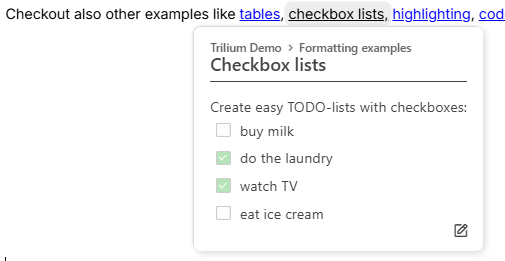
The note tooltip is a convenience feature which displays a popup when hovering over an [internal link](../../Note%20Types/Text/Links/Internal%20\(reference\)%20links.md) to another note.
The following information is displayed:
* The note path, at the top of the popup.
* The title of the note.
* Clicking on the title will open the note in the current tab.
* Holding Ctrl pressed while clicking the title will open in a new tab instead of the current one.
* A snippet of the content will be displayed as well.
* A button to [quickly edit](../Navigation/Quick%20edit.md) the note in a popup.
The tooltip can be found in multiple places, including:
* In Text notes, when hovering over Internal (reference) links .
* Collections:
* Geo Map View, when hovering over a marker.
* Calendar View, when hovering over an event.
* Table View, when hovering over a note title, or over a [relation](../../Advanced%20Usage/Attributes/Relations.md).