# Custom app-wide CSS
It is possible to provide a CSS file to be used regardless of the theme set by the user.
| | |
| --- | --- |
|  | Start by creating a new note and changing the note type to CSS |
| 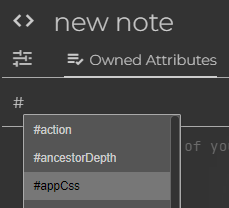 | In the ribbon, press the “Owned Attributes” section and type `#appCss`. |
| 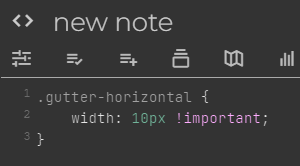 | Type the desired CSS.
Generally it's a good idea to append `!important` for the styles that are being changed, in order to prevent other |
## Seeing the changes
Adding a new _app CSS note_ or modifying an existing one does not immediately apply changes. To see the changes, press Ctrl+Shift+R to refresh the page first.
## Sample use cases
### Customizing the printing stylesheet
> [!TIP]
> Since v0.99.2, it's no longer possible to use `#appCss` to customize the printing CSS, since the printing is now done in an isolated environment.
>
> However, it's still possible to customize the CSS via `~printCss`; see Printing & Exporting as PDF for more information.
### Per-workspace styles
When using Workspaces, it can be helpful to create a visual distinction between notes in different workspaces.
To do so:
1. In the note with `#workspace`, add an inheritable attribute `#cssClass(inheritable)` with a value that uniquely identifies the workspace (say `my-workspace`).
2. Anywhere in the note structure, create a CSS note with `#appCss`.
#### Change the color of the icons in the Note Tree
```
.fancytree-node.my-workspace.fancytree-custom-icon {
color: #ff0000;
}
```
#### Change the color of the note title and the icon
To change the color of the note title and the icon (above the content):
```
.note-split.my-workspace .note-icon-widget button.note-icon,
.note-split.my-workspace .note-title-widget input.note-title {
color: #ff0000;
}
```
#### Add a watermark to the note content
1. Insert an image in any note and take the URL of the image.
2. Use the following CSS, adjusting the `background-image` and `width` and `height` to the desired values.
```
.note-split.my-workspace .scrolling-container:after {
position: fixed;
content: "";
background-image: url("/api/attachments/Rvm3zJNITQI1/image/logo.png");
background-size: contain;
background-position: center;
background-repeat: no-repeat;
width: 237px;
height: 44px;
bottom: 1em;
right: 1em;
opacity: 0.5;
z-index: 0;
}
```
## Limitations
Some parts of the application can't be styled directly via custom CSS because they are rendered in an isolated mode (shadow DOM), more specifically:
* The slides in a Presentation.
